Loop
The Loop command repeats one or more steps multiple times. It supports three modes:
| Mode | Iterates over | Typical use |
|---|---|---|
| For each field | Page elements (rows, buttons, etc.) | An unknown number of fields |
| For a range | A number range | Repeat N times |
| For Excel / CSV | Spreadsheet rows | Data-driven input |
For each field
Loops through every occurrence of a specific field and performs the actions inside the loop for each one.
It's most often used with tables. For example, entering a value into each row when the number of rows is unknown.
- Select the target field: for example, a row or column.
- Set a maximum limit: for example
3rows, so the loop cannot run forever. - Add your steps inside the loop. They'll be executed once per matching field.
Inherit field behaviour
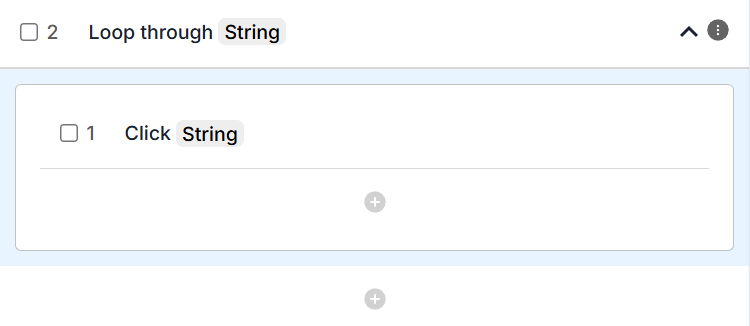
When looping through fields you can use the Inherit field option. This automatically applies each action (a click or a type) to the current field in the loop.
For example, adding a Click action inside the loop clicks that iteration's field by default. To override this, click the wand icon and select a different field.
Skip and break
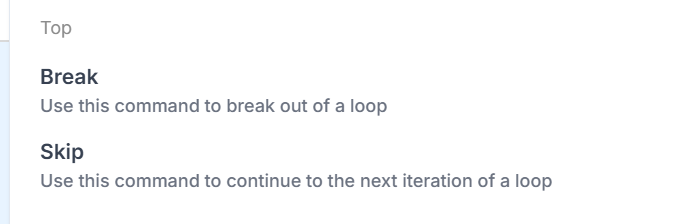
You can control the loop flow with:
- Skip: move to the next iteration
- Break: stop the loop entirely
These are commonly used with conditionals, for example "skip if field is empty": the verify branches, and one branch skips the row.
Both belong to the loop. They do nothing in a conditional that is not inside one.
For range
Runs the loop a fixed number of times instead of looping through fields.
- Define the start and end of the range. For example,
1 to 5. - Inside the loop a loop variable is created automatically, so you can reference the current iteration.
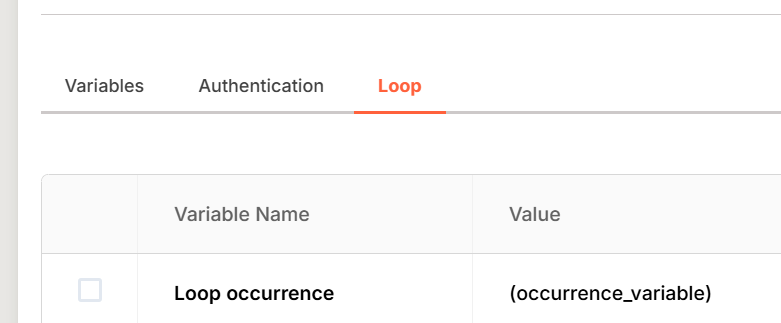
Example: repeat a form submission 5 times with different data each run.
For Excel / CSV
Enables data-driven testing by looping through each row of a spreadsheet.
- Provide a CSV or Excel file via a variable.
- The loop runs once per line in the file.
- Access the data in each column using the built-in column variable.
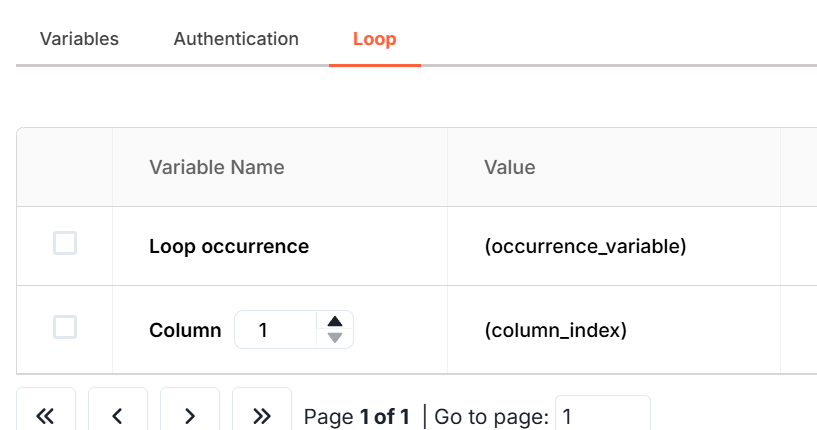
Example: if your file contains Name, Email, Role, the loop can automatically fill these into matching form fields for every row in your dataset.